> ## Documentation Index
> Fetch the complete documentation index at: https://docs.tryarchitect.com/docs/llms.txt
> Use this file to discover all available pages before exploring further.
# How to route between multiple pages
> Route traffic between two or more landing pages using Architect Page Links to run A/B tests and split traffic
Architect lets you route traffic between two or more landing pages using a single URL. You define the split, and Architect handles the routing automatically -- no changes needed in your ad platform after initial setup.
## How it works
With Architect Page Links, you create a single URL that routes visitors to different landing pages based on the split you define. For example:
* **50/50 split** -- half of traffic goes to Page A, half goes to Page B
* **Custom split** -- send 70% to one page and 30% to another
* **Multi-variant** -- split traffic evenly across three or more pages
You use this single link as your final URL in your ad campaign. Architect handles the routing automatically.
You can also split traffic between an Architect landing page and an external URL (such as your existing website), so you can test your Architect page against your current landing page.
## Set up traffic routing
Go to **Pages** in the left sidebar, select the page you want to test, and click the **Page Links** tab.
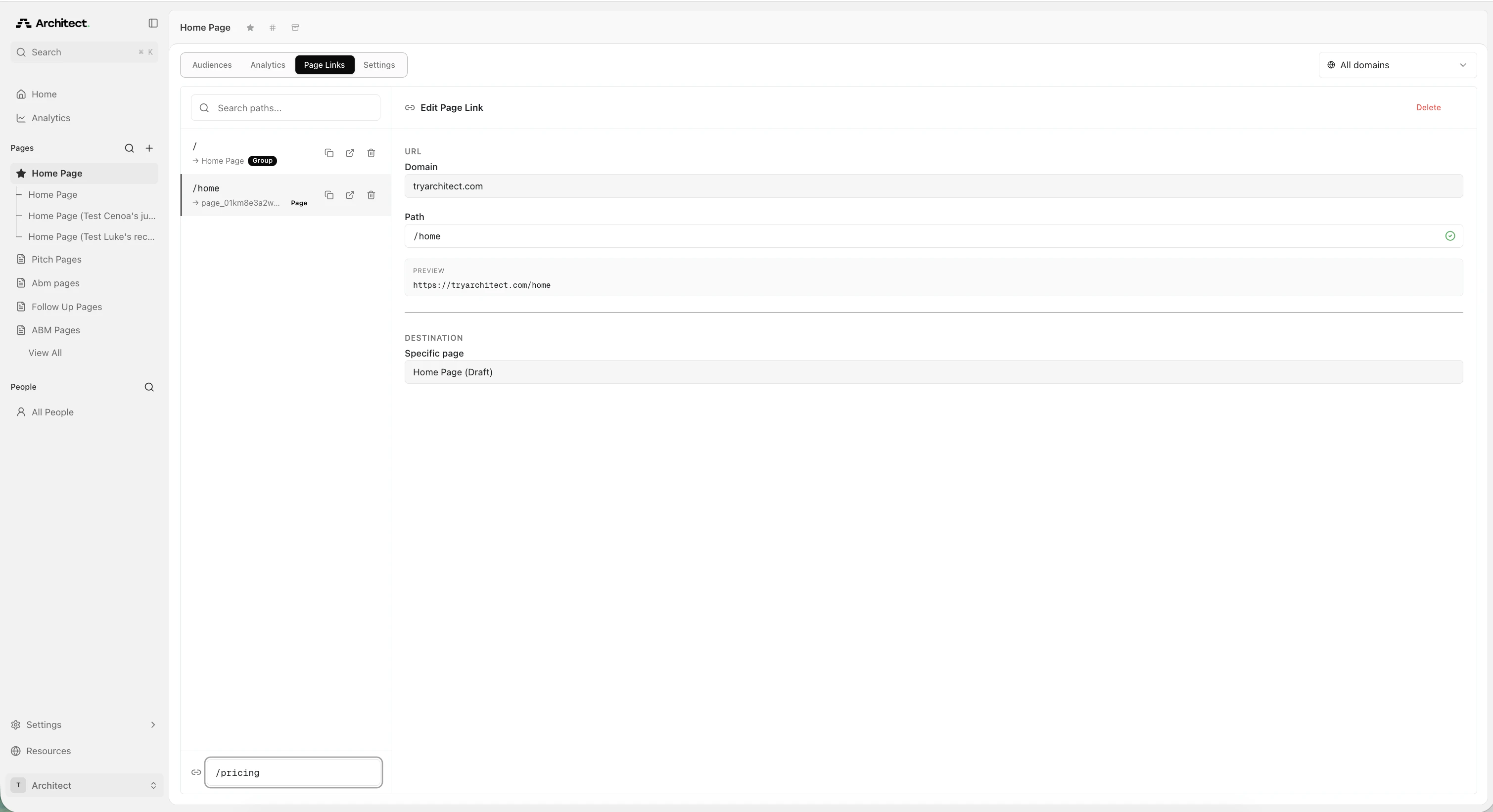 Click **+ Add page link** at the bottom of the links list. A new page link panel opens on the right.
Set the following:
* **Domain** -- choose your connected domain or use the default Architect domain
* **Path** -- enter the URL path for this link (for example, `/pricing`)
Click **+ Add page link** at the bottom of the links list. A new page link panel opens on the right.
Set the following:
* **Domain** -- choose your connected domain or use the default Architect domain
* **Path** -- enter the URL path for this link (for example, `/pricing`)
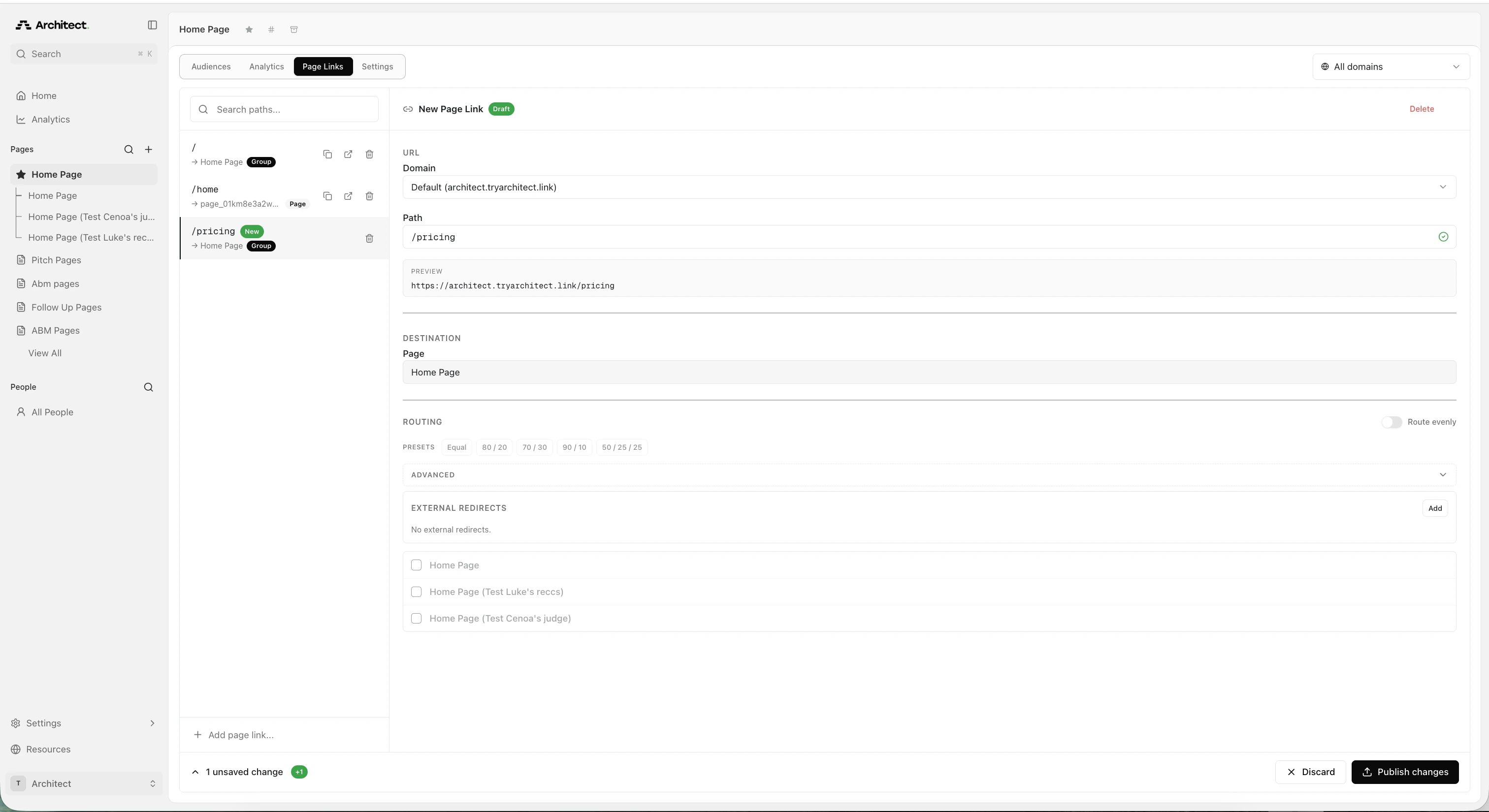 Under **Routing**, select the pages you want to include in the test. You have two options:
**Option A: Route evenly**
Toggle **Route evenly** on to split traffic equally across all published pages in the group. If you have three pages, each gets 33.3% of traffic.
Under **Routing**, select the pages you want to include in the test. You have two options:
**Option A: Route evenly**
Toggle **Route evenly** on to split traffic equally across all published pages in the group. If you have three pages, each gets 33.3% of traffic.
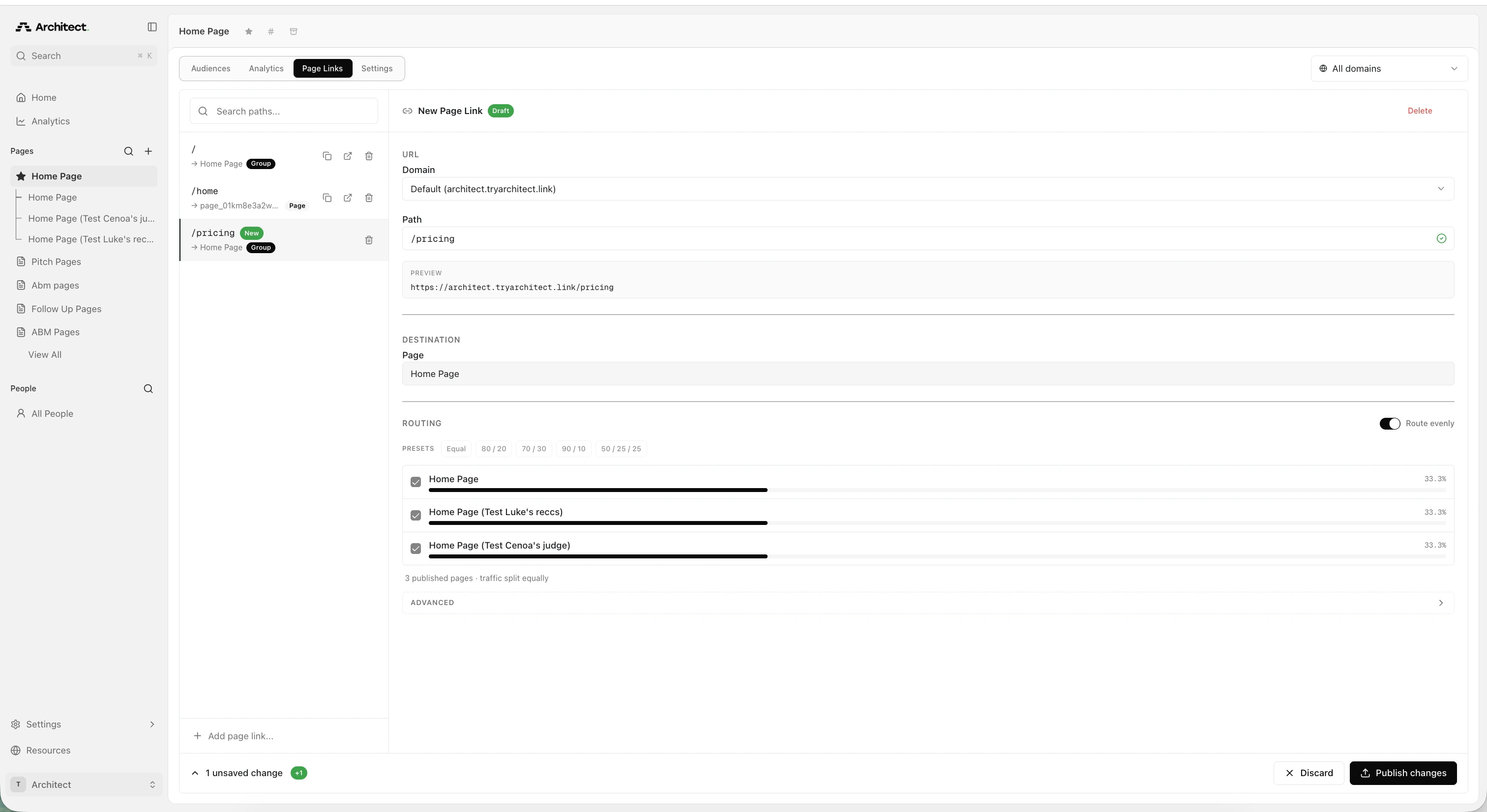 **Option B: Custom split**
Leave **Route evenly** off and use the routing presets (Equal, 80/20, 70/30, 90/10, 50/25/25) or manually adjust the percentage for each page.
If you want to test your Architect page against your existing website, expand the **Advanced** section and add an external redirect under **External Redirects**:
1. Click **Add** next to External Redirects
2. Enter the URL of your existing page (for example, `https://acme.com/`)
3. Enable **Preserve query params** if you need to pass UTM parameters or tracking data through to the external URL
4. Adjust the traffic split between your Architect page and the external URL using the `+` and `-` controls
**Option B: Custom split**
Leave **Route evenly** off and use the routing presets (Equal, 80/20, 70/30, 90/10, 50/25/25) or manually adjust the percentage for each page.
If you want to test your Architect page against your existing website, expand the **Advanced** section and add an external redirect under **External Redirects**:
1. Click **Add** next to External Redirects
2. Enter the URL of your existing page (for example, `https://acme.com/`)
3. Enable **Preserve query params** if you need to pass UTM parameters or tracking data through to the external URL
4. Adjust the traffic split between your Architect page and the external URL using the `+` and `-` controls
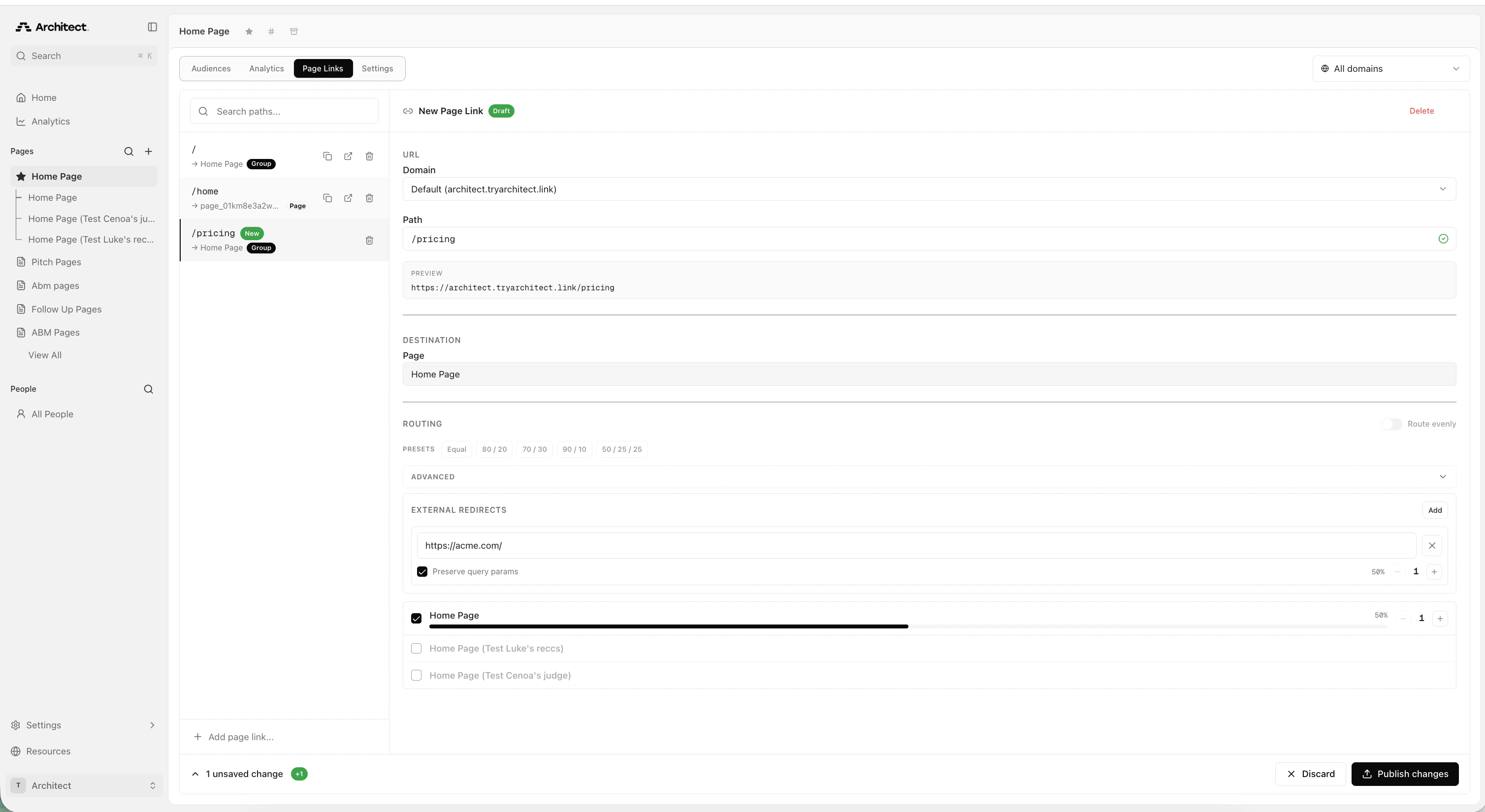 External redirects are particularly useful if you want to A/B test landing pages for Performance Max (PMAX) campaigns, since Google Ads does not support landing page experiments for PMAX natively.
Click **Publish changes** at the bottom right to make the page link live. Copy the preview URL and use it as the final URL in your ad campaign.
## Tips for running A/B tests
* **Start with a 50/50 split** to get statistically significant results faster.
* **Run the test for at least 2 weeks** before drawing conclusions -- ad campaigns need time to optimize.
* **Change one variable at a time** (headline, layout, CTA) so you can attribute performance differences to a specific change.
* **Monitor results in Architect Analytics** to track page views and conversions for each variant.
* **Use the same page link URL** throughout the test. Changing the URL mid-test resets campaign learning.
## FAQ
Yes. Architect passes all UTM parameters to both pages. As long as you have the script for tracking conversions set up on your page, this will work.
## Related topics
- [What is Architect?](/docs/index.md)
- [Changelog](/docs/changelog.md)
- [What is an Agentic Website?](/docs/overview/overview/what-is-an-agentic-website.md)
- [How to Pull Digital Ad CSV (For Ads)](/docs/overview/for-ads/how-to-pull-digital-ad-csv-for-ads.md)
- [Architect for Slack](/docs/overview/integrations/slack.md)
External redirects are particularly useful if you want to A/B test landing pages for Performance Max (PMAX) campaigns, since Google Ads does not support landing page experiments for PMAX natively.
Click **Publish changes** at the bottom right to make the page link live. Copy the preview URL and use it as the final URL in your ad campaign.
## Tips for running A/B tests
* **Start with a 50/50 split** to get statistically significant results faster.
* **Run the test for at least 2 weeks** before drawing conclusions -- ad campaigns need time to optimize.
* **Change one variable at a time** (headline, layout, CTA) so you can attribute performance differences to a specific change.
* **Monitor results in Architect Analytics** to track page views and conversions for each variant.
* **Use the same page link URL** throughout the test. Changing the URL mid-test resets campaign learning.
## FAQ
Yes. Architect passes all UTM parameters to both pages. As long as you have the script for tracking conversions set up on your page, this will work.
## Related topics
- [What is Architect?](/docs/index.md)
- [Changelog](/docs/changelog.md)
- [What is an Agentic Website?](/docs/overview/overview/what-is-an-agentic-website.md)
- [How to Pull Digital Ad CSV (For Ads)](/docs/overview/for-ads/how-to-pull-digital-ad-csv-for-ads.md)
- [Architect for Slack](/docs/overview/integrations/slack.md)